TAgg2D.AlignPoint(x, y)
Description
Due to the Anti Aliasing technique (that's heavily used in AGG), it may be sometimes hard to achieve rendering of lines that are, e.g., exactly 1 pixel wide.
You can read more about this issue here.
This line alignment problem can be partially solved by aligning the coordinates to the 0.5 subpixels (in screen coordinates), so that the lines would always have 100% opaque area.
Basic formula to do this alignment is: x = floor(x) + 0.5
This method is a helper method for reversely calculating world coordinates in such a way that after the current transformations they become aligned on 0.5 fractional subpixel boundary.
Parameters
x: PDouble
Initial X world (user) system coordinate. This parameter receives aligned value of X coordinate (in world coordinates system), that will snap to the 0.5 subpixel boundary on X axis when rendering on screen.
y: PDouble
Initial Y world (user) system coordinate. This parameter receives aligned value of Y coordinate (in world coordinates system), that will snap to the 0.5 subpixel boundary on Y axis when rendering on screen.
Example
var
  x1, y1, x2, y2: double;
begin
  if VG.Attach(Image1.Picture.Bitmap) then begin

    VG.ClearAll(255, 255, 255);

    // Initial coordinates
    x1 := 10;
    y1 := 30;
    x2 := 150;
    y2 := 30;

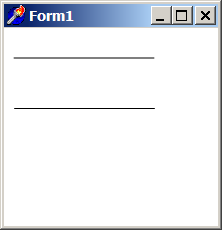
    // This line seems to be bold with line width = 1
    VG.Line(x1, y1, x2, y2);

    // We correct coordinates
    VG.AlignPoint(@x1, @y1);
    VG.AlignPoint(@x2, @y2);

    // We shift coordinates down to see the result beneath
    VG.Translate(0, 50);

    // After correction,
    // this line seems to be ok with line width = 1
    VG.Line(x1, y1, x2, y2);

  end;
end;