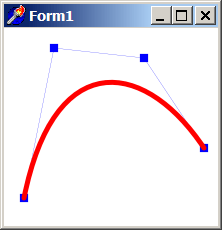
TAgg2D.Curve(x1, y1, x2, y2, x3, y3, x4, y4)
Description
Draws cubic Bézier curve at defined coordinates.
Cubic Bézier segments are defined by four control points (x1, y1), (x2, y2), (x3, y3) and (x4, y4). The curve starts at (x1, y1) and ends at (x4, y4). The shape of the curve is influenced by the placement of the internal control points (x2, y2) and (x3, y3), but the curve does not usually pass through those points. Assuming non-coincident control points, the tangent of the curve at the initial point x1 is aligned with and has the same direction as the vector x2 — x1 and the tangent at the final point x4 is aligned with and has the same direction as the vector x4 — x3.
Parameters
x1: double
X coordinate of starting control point [in subpixels].
y1: double
Y coordinate of starting control point [in subpixels].
x2: double
X coordinate of first internal control point [in subpixels].
y2: double
Y coordinate of first internal control point [in subpixels].
x3: double
X coordinate of second internal control point [in subpixels].
y3: double
Y coordinate of second internal control point [in subpixels].
x4: double
X coordinate of ending control point [in subpixels].
y4: double
Y coordinate of ending control point [in subpixels].
Example
if VG.Attach(Image1.Picture.Bitmap) then begin

  VG.ClearAll(255, 255, 255);

  // Indicate Path for Curve
  VG.LineColor($00, $00, $FF);
  VG.FillColor($00, $00, $FF);
  VG.LineWidth(0.2);

  VG.Rectangle(20 - 4, 170 - 4, 20 + 4, 170 + 4);
  VG.Rectangle(50 - 4, 20 - 4, 50 + 4, 20 + 4);
  VG.Rectangle(140 - 4, 30 - 4, 140 + 4, 30 + 4);
  VG.Rectangle(200 - 4, 120 - 4, 200 + 4, 120 + 4);

  VG.Line(20, 170, 50, 20);
  VG.Line(50, 20, 140, 30);
  VG.Line(140, 30, 200, 120);

  // Draw Cubic Bézier curve itself
  VG.LineColor($FF, $00, $00);
  VG.FillColor($FF, $FF, $00);
  VG.LineWidth(5);

  VG.Curve(20, 170, 50, 20, 140, 30, 200, 120);

end;