TAgg2D.FlipText(flip)
Description
Changes the vertical direction of fonts being used for rendering of text.
Change to the font vertical direction will be in effect at next call to the Font method.
This method is useful if user wishes to have a coordinate system originating in Bottom Left corned. Without flipping, the text would hang upside-down. Flipping also considers text alignment rules when rendering.
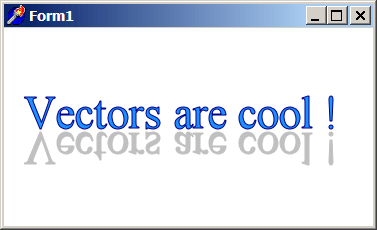
Text flipping can be also used to achieve a mirror-like effect, like in example below.
Parameters
flip: boolean
Indicates the vertical direction of fonts.
TRUE means fonts are upside-down.
FALSE means fonts are in the same vertical direction as the current coordinate system.
Example
if VG.Attach(Image1.Picture.Bitmap) then begin

  VG.ClearAll(255, 255, 255);

  // Normal Text
  VG.LineColor($00, $00, $8B);
  VG.FillColor($1E, $90, $FF);

  VG.Font('Times New Roman', 45);
  VG.Text(20, 100, 'Vectors are cool !');

  // Upside-down Text
  VG.FlipText(true);

  VG.LineColor($C0, $C0, $C0);
  VG.FillColor($C0, $C0, $C0);

  VG.Font('Times New Roman', 45);
  VG.Text(20, 105, 'Vectors are cool !');

end;