
TAgg2D — Introduction to the Application Programming Interface (API)
To use TAgg2D vector graphics engine in your software project you just:
- Create a TAgg2D instance.
- Attach an instance of TAgg2D to a pf24bit or pf32bit TBitmap (or descendant).
- Perform your drawing routine (issue API drawing commands).
Library setup note:
TAgg2D is located in the file "Agg2D.pas", which is in the "../src" subdirectory. So the whole setup of AggPas library is to add a search path to "../AggPasMod/Source" and to include AggPas with "uses Agg2D" clause.
It is recommended to create each instance of TAgg2D just once for the whole life of TForm. More instances of TAgg2D can coexist simultaneously and they can be attached to the same TBitmap surface at the same time. The reason for doing this is to have different states of vector engine in one place (each instance can have a different state of coordinate transformations, for example, or anything that can be set up). TAgg2D is not thread safe, so each thread should own its own vector engine.
After attachment (to the TBitmap) the state of the vector engine becomes default. This lets users achieve the same starting conditions for the drawing routine. So you have to set up the line color, fill rule, transformations, clipping, etc.
Since TAgg2D renders on fly directly to the physical surface of TBitmap, the drawing routine (after attachment) can be performed anytime it is required. It can be outside the OnPaint method and also outside WM_PAINT windows message. But as well it can be also a part of those painting methods.
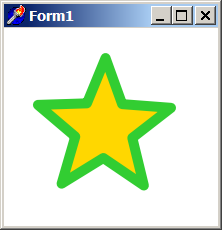
Here is an introductory example of drawing with TAgg2D:
if VG.Attach(Image1.Picture.Bitmap) then begin

  VG.ClearAll(255, 255, 255);
  VG.LineWidth(10);
  VG.LineColor($32, $cd, $32);
  VG.FillColor($ff, $d7, $00);

  VG.Star(100, 100, 30, 70, 55, 5);

end;
Which results in:
Example download:
tagg2d_example02.zip
tagg2d_example02.exe


