TAgg2D.LineLinearGradient(x1, y1, x2, y2, c1, c2, profile)
Description
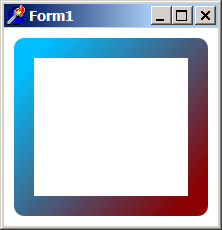
Linear line gradient increases linearly along the line from starting to ending point and it is constant along perpendicular lines.
Starting point is defined by x1:y1 couple and ending point by x2:y2 couple.
Method internally computes an angle at which the line goes, and gradient gets sloped by that angle all the way.
Linear line gradient is consequently used to fill strokes of objects being drawn. If there is a need to get the stroke filling before gradient's starting point, the c1 color is used as a solid color fill up to the starting point. Similarly space after the ending point is filled with solid c2 color fill.
Parameters
x1: double
X coordinate of gradient starting point [in subpixels].
y1: double
Y coordinate of gradient starting point [in subpixels].
x2: double
X coordinate of gradient ending point [in subpixels].
y2: double
Y coordinate of gradient ending point [in subpixels].
c1: TAggColor [*]
First color of the gradient ramp [data sructure (r, g, b, a)].
c2: TAggColor [*]
Last color of the gradient ramp [data sructure (r, g, b, a)].
profile: double = 1.0
Defines, how to distribute the color transitions beginning from the halfway between starting and ending points of gradient color ramp. A value of 1 means to distribute colors proportionally on the whole length. Values less than 1 approximating to 0 define the ratio by which the transition is distributed more to the halfway position. Values more than 1 define expansion from halfway position, (to a maximum of starting and ending points boundaries).
Example
if VG.Attach(Image1.Picture.Bitmap) then begin

  VG.ClearAll(255, 255, 255);

  // Turn off filling & Set wide stroke
  VG.NoFill;
  VG.LineWidth(20);

  // Gradient colors
  // from DeepSkyBlue #00BFFF - DarkRed #8B0000
  c1.Construct($00, $BF, $FF);
  c2.Construct($8B, $00, $00);

  // Gradient proceeds from Top Left corner (20:20)
  // to the Bottom Right corner
  // (ClientWidth - 20:ClientHeight - 20)
  VG.LineLinearGradient(20, 20, ClientWidth - 20, ClientHeight - 20, c1, c2, 0.9);

  // Gradient appears as a filling of objects stroke
  VG.Rectangle(20, 20, ClientWidth - 20, ClientHeight - 20);

end;