TAgg2D.Parallelogram(x1, y1, x2, y2, para)
Description
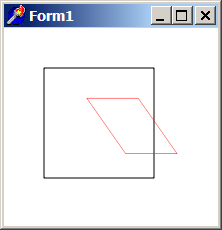
Transforms source coordinates system rectangle into the destination parallelogram. Parallelogram transformation preserves orientations and changes ratios, angles and distances.
Parameters
x1: double
X coordinate of Top Left corner of source rectangle [in subpixels].
y1: double
Y coordinate of Top Left corner of source rectangle [in subpixels].
x2: double
X coordinate of Bottom Right corner of source rectangle [in subpixels].
y2: double
Y coordinate of Bottom Right corner of source rectangle [in subpixels].
para: PDouble
Pointer to the first element of an array containing six values defining the destination parallelogram [in subpixels].
Individual corners of parallelogram are in this order: Top Left (x,y), Top Right (x,y) and Bottom Right (x,y). The fourth corner (Bottom Left) is internally computed from the three others.
Example
if VG.Attach(Image1.Picture.Bitmap) then begin

  VG.ClearAll(255, 255, 255);
  VG.NoFill;

  // First rectangle
  VG.Rectangle(40, 40, 150, 150);

  // Define destination parallelogram
  para[1] := 50;
  para[2] := 50;
  para[3] := 150;
  para[4] := 50;
  para[5] := 220;
  para[6] := 150;

  // Parallelogram transformation
  VG.Parallelogram(0, 0, ClientWidth, ClientHeight, @para[1 ]);

  // The same rectangle in a new parallelogram coordinates
  VG.LineColor($FF, $00, $00);
  VG.Rectangle(40, 40, 150, 150);

end;