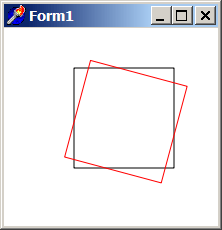
TAgg2D.Rotate(angle)
Description
Rotates coordinates system around the center of rotation by a given angle. Rotation preserves orientations, distances, ratios and angles.
When no transformations are applied, center of rotation is either in Top Left or Bottom Left corner of TBitmap surface (depending on how was the flip_y parameter set in call to the Attach method). Center of rotation may change with Translation or Skewing.
Parameters
angle: double
A value defining the angle of rotation [in radians].
If user wish to define the angle value in degrees, the Deg2Rad standalone API function can be used for this.
Example
if VG.Attach(Image1.Picture.Bitmap) then begin

  VG.ClearAll(255, 255, 255);
  VG.NoFill;

  // First rectangle
  VG.Rectangle(70, 40, 170, 140);

  // Rotate by 15 degrees
  VG.Rotate(Deg2Rad(15));

  // The same rectangle in a new coordinates
  VG.LineColor($FF, $00, $00);
  VG.Rectangle(70, 40, 170, 140);

end;
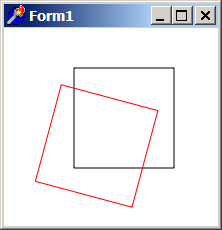
Remarks
One frequent case for rotation transformation is rotating something around its own axis. For example, if user wants to rotate the whole TBitmap surface (around its axis), two more translations must be involved, because before rotation the center of rotation is in coordinates origin (which is Top Left or Bottom Left corner). So the transformation sequence changes like this:
if VG.Attach(Image1.Picture.Bitmap) then begin

  VG.ClearAll(255, 255, 255);
  VG.NoFill;

  // First rectangle
  VG.Rectangle(70, 40, 170, 140);

  // [!] set center point to the middle of TBitmap surface
  VG.Translate(-ClientWidth / 2, -ClientHeight / 2);

  // Rotate by 15 degrees
  VG.Rotate(Deg2Rad(15));

  // [!] return coordinates system back
  VG.Translate(ClientWidth / 2, ClientHeight / 2);

  // The same rectangle in a new coordinates
  VG.LineColor($FF, $00, $00);
  VG.Rectangle(70, 40, 170, 140);

end;