TAgg2D.Scale(sx, sy)
Description
Enlarges or diminishes coordinates system by a scale factors in two directions focusing around the center of scaling. Scaling may change orientations (in the case of reflections). If scaling is uniform (both factors equals), it preserves ratios and angles, otherwise not. Scaling always changes distances (lengths).
When no transformations are applied, center of scaling is either in Top Left or Bottom Left corner of TBitmap surface (depending on how was the flip_y parameter set in call to the Attach method). Center of scaling may change with Translation or Skewing.
Zooming around some exact point involves two more translations similarly to the case with rotation around own axis.
Parameters
sx: double
Scale factor for X axis direction (1 = no scale).
sy: double
Scale factor for Y axis direction (1 = no scale).
Example
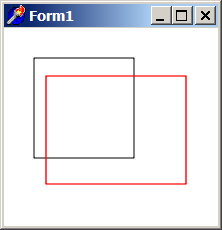
if VG.Attach(Image1.Picture.Bitmap) then begin

  VG.ClearAll(255, 255, 255);
  VG.NoFill;

  // First rectangle
  VG.Rectangle(30, 30, 130, 130);

  // Scale 40% on X axis and 20% on Y axis
  VG.Scale(1.4, 1.2);

  // The same rectangle in a new coordinates
  VG.LineColor($FF, $00, $00);
  VG.Rectangle(30, 40, 130, 130);

end;
Remarks
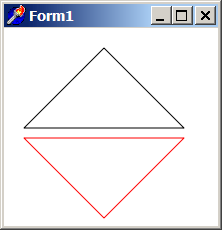
Scaling with negative factors generates reflections. That can be utilized to create a mirror-like effects. (One additional translation must be involved to get the effect.)
if VG.Attach(Image1.Picture.Bitmap) then begin

  VG.ClearAll(255, 255, 255);
  VG.NoFill;

  // First triangle
  VG.Triangle(100, 20, 20, 100, 180, 100);

  // Reflect along X axis
  VG.Scale(1, -1);
  VG.Translate(0, 210);

  // The same triangle reflected in a new coordinates
  VG.LineColor($FF, $00, $00);
  VG.Triangle(100, 20, 20, 100, 180, 100);

end;