TAgg2D.Skew(sx, sy)
Description
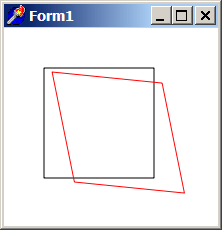
Moves coordinates system in one direction that's proportional to the distance away from the origin in the other dimension by a skew factors in horizontal and vertical directions focusing around the center of skewing. Skew (also called shear) preserves only orientations and changes ratios, angles and distances.
When no transformations are applied, center of skewing is either in Top Left or Bottom Left corner of TBitmap surface (depending on how was the flip_y parameter set in call to the Attach method). Center of skewing may change with Translation or another Skewing.
Skewing around some exact point involves two more translations similarly to the case with rotation and scale around own axis.
Parameters
sx: double
Horizontal skew factor (0 = no skew) [Values from -1 to 1 are reasonable].
sy: double
Vertical skew factor (0 = no skew) [Values from -1 to 1 are reasonable].
Example
if VG.Attach(Image1.Picture.Bitmap) then begin

  VG.ClearAll(255, 255, 255);
  VG.NoFill;

  // First rectangle
  VG.Rectangle(40, 40, 150, 150);

  // Skew horizontally by 20% and vertically by 10%
  VG.Skew(0.2, 0.1);

  // The same rectangle in a new skewed coordinates
  VG.LineColor($FF, $00, $00);
  VG.Rectangle(40, 40, 150, 150);

end;