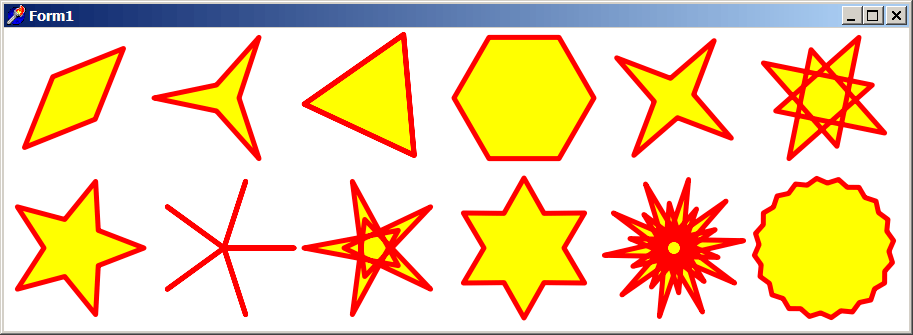
TAgg2D.Star (cx, cy, r1, r2, startAngle, numRays)
Description
Draws multigon at defined center point with following algorithm:
- Circle is divided into double amount of segments, as defined amount of rays (of star).
- Starting from 3 hours going clockwise (shifted by a start angle), a multigon is created by connecting individual cusps of multigon, that are product of intersection of a ray from center point and length defined either by r2 or r1 radius.
- First cusp is generated from r2 length intersection with a ray from center point towards a line on 3 hours (shifted by a start angle). Segment angle is added and next cusp is generated from r1 length intersection with a ray from center point towards a line on 3 hours (shifted by a start angle plus added segment angle on previous step).
- The rest of cusps are generated by continuously adding the segment angle and intersecting r2 or r1 lengths with a ray from center point.
While the algorithm may seem complicated, it allows a creation of more shapes than just a star. If r1 and r2 lengths are equal, generated is a polygon with double amount of sides as requested rays of star. If r1 is considerably different from r2, generated is a star shape with required number of rays. If r1 approximates r2, generated is rounded shape with a wavy border. On low number of rays (2 and 3) a shapes like triangle and diamond can be generated. If r1 or r2 is zero, a spoky like shapes are generated. If one of r1/r2 lengths is negative, a colliding stroked star is generated.
Parameters
cx: double
X coordinate of multigon's center point [in subpixels].
cy: double
Y coordinate of multigon's center point [in subpixels].
r1: double
Radius length of the outer cusp of multigon [in subpixels].
r2: double
Radius length of the inner cusp of multigon [in subpixels].
startAngle: double
Rotation angle of the starting line on 3 hours going clockwise [in radians].
numRays: integer
Amount of required rays for a star shape generation.
Example
if VG.Attach(Image1.Picture.Bitmap) then begin

  VG.ClearAll(255, 255, 255);

  // Line color & width
  VG.LineColor($FF, $00, $00);
  VG.FillColor($FF, $FF, $00);
  VG.LineWidth(5);

  // Variating a number of Star multigons
  VG.Translate(-30, -30);
  VG.Star(100, 100, 70, 30, Deg2Rad(45), 2);

  VG.Translate(150, 0);
  VG.Star(100, 100, 70, 15, Deg2Rad(0), 3);

  VG.Translate(150, 0);
  VG.Star(100, 100, -70, 70, Deg2Rad(55), 3);

  VG.Translate(150, 0);
  VG.Star(100, 100, 70, 70, Deg2Rad(0), 3);

  VG.Translate(150, 0);
  VG.Star(100, 100, 20, 70, Deg2Rad(35), 4);

  VG.Translate(150, 0);
  VG.Star(100, 100, 50, -70, Deg2Rad(30), 4);

  VG.Translate(-150 *5, 150);
  VG.Star(100, 100, 30, 70, Deg2Rad(0), 5);

  VG.Translate(150, 0);
  VG.Star(100, 100, 0, 70, Deg2Rad(0), 5);

  VG.Translate(150, 0);
  VG.Star(100, 100, 30, -70, Deg2Rad(0), 5);

  VG.Translate(150, 0);
  VG.Star(100, 100, 40, 70, Deg2Rad(30), 6);

  VG.Translate(150, 0);
  VG.Star(100, 100, -45, 70, Deg2Rad(30), 10);

  VG.Translate(150, 0);
  VG.Star(100, 100, 65, 70, Deg2Rad(30), 20);

end;