TAgg2D.TextAlignment(alignX, alignY)
Description
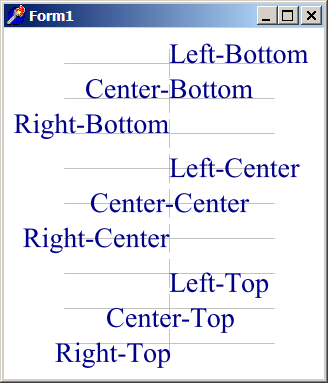
Changes the type of horizontal and vertical alignment around the Text Origin.
When calling the Text method, a x:y coordinates are passed to define at which position the text should be rendered. This position is the Text Origin.
On X axis, the default Text Origin is considered to be in the leftmost position of bounding box (bbox) of first glyph of text (AGG_AlignLeft).
On Y axis, the default Text Origin is considered to be on the font's base line (AGG_AlignBottom).
Parameters
alignX: TAggTextAlignment [*]
Horizontal alignment of text around the X coordinate of Text Origin.
alignY: TAggTextAlignment [*]
Vertical alignment of text aroundthe Y coordinate of Text Origin.
Example
if VG.Attach(Image1.Picture.Bitmap) then begin

  VG.ClearAll(255, 255, 255);

  // Some prior positioning
  VG.Scale(0.7, 0.7);
  VG.Translate(-10, -70);

  // Text Alignment leading lines
  VG.LineColor($A9, $A9, $A9);
  VG.Line(250.5 - 150, 150.5, 250.5 + 150, 150.5);
  VG.Line(250.5, 150.5 - 20, 250.5, 150.5 + 20);
  VG.Line(250.5 - 150, 200.5, 250.5 + 150, 200.5);
  VG.Line(250.5, 200.5 - 20, 250.5, 200.5 + 20);
  VG.Line(250.5 - 150, 250.5, 250.5 + 150, 250.5);
  VG.Line(250.5, 250.5 - 20, 250.5, 250.5 + 20);
  VG.Line(250.5 - 150, 300.5, 250.5 + 150, 300.5);
  VG.Line(250.5, 300.5 - 20, 250.5, 300.5 + 20);
  VG.Line(250.5 - 150, 350.5, 250.5 + 150, 350.5);
  VG.Line(250.5, 350.5 - 20, 250.5, 350.5 + 20);
  VG.Line(250.5 - 150, 400.5, 250.5 + 150, 400.5);
  VG.Line(250.5, 400.5 - 20, 250.5, 400.5 + 20);
  VG.Line(250.5 - 150, 450.5, 250.5 + 150, 450.5);
  VG.Line(250.5, 450.5 - 20, 250.5, 450.5 + 20);
  VG.Line(250.5 - 150, 500.5, 250.5 + 150, 500.5);
  VG.Line(250.5, 500.5 - 20, 250.5, 500.5 + 20);
  VG.Line(250.5 - 150, 550.5, 250.5 + 150, 550.5);
  VG.Line(250.5, 550.5 - 20, 250.5, 550.5 + 20);

  // Font & Colors
  VG.FillColor($00, $00, $8B);
  VG.NoLine;
  VG.TextHints(false);
  VG.Font('Times New Roman', 40.0, false, false, AGG_VectorFontCache);

  // All Text Alignment Cases
  VG.TextAlignment(AGG_AlignLeft, AGG_AlignBottom);
  VG.Text(250.0, 150.0, 'Left-Bottom', true, 0, 0);

  VG.TextAlignment(AGG_AlignCenter, AGG_AlignBottom);
  VG.Text(250.0, 200.0, 'Center-Bottom', true, 0, 0);

  VG.TextAlignment(AGG_AlignRight, AGG_AlignBottom);
  VG.Text(250.0, 250.0, 'Right-Bottom', true, 0, 0);

  VG.TextAlignment(AGG_AlignLeft, AGG_AlignCenter);
  VG.Text(250.0, 300.0, 'Left-Center', true, 0, 0);

  VG.TextAlignment(AGG_AlignCenter, AGG_AlignCenter);
  VG.Text(250.0, 350.0, 'Center-Center', true, 0, 0);

  VG.TextAlignment(AGG_AlignRight, AGG_AlignCenter);
  VG.Text(250.0, 400.0, 'Right-Center', true, 0, 0);

  VG.TextAlignment(AGG_AlignLeft, AGG_AlignTop);
  VG.Text(250.0, 450.0, 'Left-Top', true, 0, 0);

  VG.TextAlignment(AGG_AlignCenter, AGG_AlignTop);
  VG.Text(250.0, 500.0, 'Center-Top', true, 0, 0);

  VG.TextAlignment(AGG_AlignRight, AGG_AlignTop);
  VG.Text(250.0, 550.0, 'Right-Top', true, 0, 0);

end;