TAgg2D.TransformImagePath(bitmap, dstX1, dstY1, dstX2, dstY2)
Description
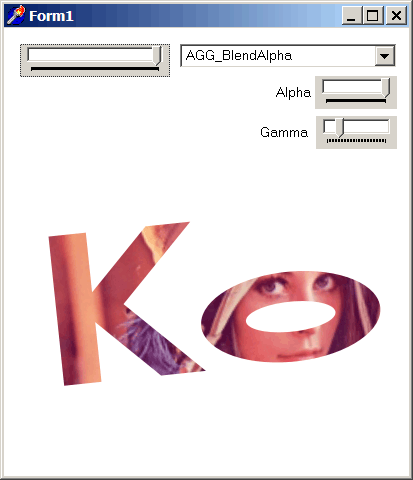
Draws a TBitmap image as an interior of currently defined path at image size defined by target surface rectangle.
Parameters
bitmap: TBitmap
Reference to non empty pf32bit TBitmap (or descendant).
dstX1: double
X coordinate of target surface rectangle Top Left corner, relative to the Top Left bounding box of currently defined path to be filled with image [in subpixels].
dstY1: double
Y coordinate of target surface rectangle Top Left corner, relative to the Top Left bounding box of currently defined path to be filled with image [in subpixels].
dstX2: double
X coordinate of target surface rectangle Bottom Right corner, relative to the Top Left bounding box of currently defined path to be filled with image [in subpixels].
dstY2: double
Y coordinate of target surface rectangle Bottom Right corner, relative to the Top Left bounding box of currently defined path to be filled with image [in subpixels].
Example
// Cut and paste this into the tagg2d_example08.zip

if VG.Attach(Image1.Picture.Bitmap) then begin

  VG.ClearAll(255, 255, 255, 0);

  // Setting master parameters
  VG.MasterAlpha(TrackBar2.Position / 255);
  VG.AntiAliasGamma(TrackBar3.Position / 10);
  VG.BlendMode(BM);
  VG.FillEvenOdd(true);

  // Rotate path with Lena image around own axis
  VG.Translate(30, 30);
  VG.Scale(1.5, 1.5);

  VG.Translate(-(50 + Image2.Picture.Bitmap.Width / 2),
   -(150 + Image2.Picture.Bitmap.Height / 2));
  VG.Rotate(Deg2Rad(TrackBar1.Position));
  VG.Translate((50 + Image2.Picture.Bitmap.Width / 2),
   (150 + Image2.Picture.Bitmap.Height / 2));

  // Define the "Ko" path
  VG.ResetPath;
  VG.MoveTo(5, 200);
  VG.LineTo(5, 100);
  VG.LineTo(30, 100);
  VG.LineTo(30, 140);
  VG.LineTo(70, 100);
  VG.LineTo(100, 100);
  VG.LineTo(50, 150);
  VG.LineTo(100, 200);
  VG.LineTo(70, 200);
  VG.LineTo(30, 160);
  VG.LineTo(30, 200);
  VG.ClosePolygon;

  VG.MoveTo(160, 200);
  VG.ArcTo (40, 20, 0, false, true, 160, 140);
  VG.ArcTo (40, 20, 0, false, true, 160, 200);
  VG.ClosePolygon;

  VG.MoveTo(160, 180);
  VG.ArcTo (30, 10, 0, false, true, 160, 160);
  VG.ArcTo (30, 10, 0, false, true, 160, 180);
  VG.ClosePolygon;

  // Draw the bitmap
  VG.TransformImagePath(Image2.Picture.Bitmap,
   0, 0, Image2.Picture.Bitmap.Width + 30, Image2.Picture.Bitmap.Height + 30);

end;