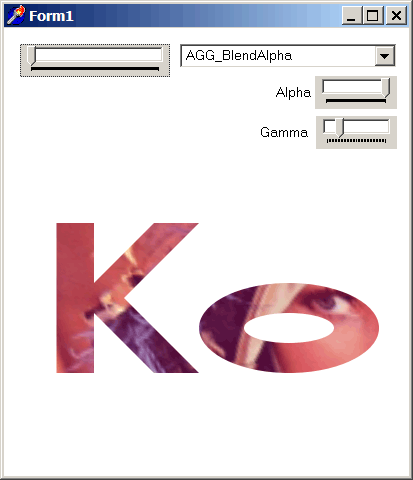
TAgg2D.TransformImagePath(bitmap, imgX1, imgY1, imgX2, imgY2, parallelo)
Description
Draws a TBitmap image as an interior of currently defined path at image size defined by target surface parallelogram, while getting the image data from defined source image rectangle.
Parameters
bitmap: TBitmap
Reference to non empty pf32bit TBitmap (or descendant).
imgX1: integer
X coordinate of source image data Top Left corner [in pixels].
imgY1: integer
Y coordinate of source image data Top Left corner [in pixels].
imgX2: integer
X coordinate of source image data Bottom Right corner [in pixels].
imgY2: integer
Y coordinate of source image data Bottom Right corner [in pixels].
parallelo: PDouble
Pointer to the first element of an array defining the three coordinates of target surface parallelogram, relative to the Top Left bounding box of currently defined path to be filled with image [all elements in subpixels].
Individual corners of parallelogram are in this order: Top Left (x,y), Top Right (x,y) & Bottom Right(x,y). The remaining Bottom Left (x,y) corner is computed internally from the other three corners.
Example
// Cut and paste this into the tagg2d_example08.zip

if VG.Attach(Image1.Picture.Bitmap) then begin

  VG.ClearAll(255, 255, 255, 0);

  // Setting master parameters
  VG.MasterAlpha(TrackBar2.Position / 255);
  VG.AntiAliasGamma(TrackBar3.Position / 10);
  VG.BlendMode(BM);
  VG.FillEvenOdd(true);

  // Rotate path with Lena image around own axis
  VG.Translate(30, 30);
  VG.Scale(1.5, 1.5);

  VG.Translate(-(50 + Image2.Picture.Bitmap.Width / 2),
   -(150 + Image2.Picture.Bitmap.Height / 2));
  VG.Rotate(Deg2Rad(TrackBar1.Position));
  VG.Translate((50 + Image2.Picture.Bitmap.Width / 2),
   (150 + Image2.Picture.Bitmap.Height / 2));

  // Define the "Ko" path
  VG.ResetPath;
  VG.MoveTo(5, 200);
  VG.LineTo(5, 100);
  VG.LineTo(30, 100);
  VG.LineTo(30, 140);
  VG.LineTo(70, 100);
  VG.LineTo(100, 100);
  VG.LineTo(50, 150);
  VG.LineTo(100, 200);
  VG.LineTo(70, 200);
  VG.LineTo(30, 160);
  VG.LineTo(30, 200);
  VG.ClosePolygon;

  VG.MoveTo(160, 200);
  VG.ArcTo (40, 20, 0, false, true, 160, 140);
  VG.ArcTo (40, 20, 0, false, true, 160, 200);
  VG.ClosePolygon;

  VG.MoveTo(160, 180);
  VG.ArcTo (30, 10, 0, false, true, 160, 160);
  VG.ArcTo (30, 10, 0, false, true, 160, 180);
  VG.ClosePolygon;

  // Draw the bitmap
  parall[1] := 0;
  parall[2] := 0;
  parall[3] := Image2.Picture.Bitmap.Width;
  parall[4] := 0;
  parall[5] := Image2.Picture.Bitmap.Width + 80;
  parall[6] := Image2.Picture.Bitmap.Height;

  VG.TransformImagePath(Image2.Picture.Bitmap,
   60, 40, Image2.Picture.Bitmap.Width - 60, Image2.Picture.Bitmap.Height - 60,
   @parall[1]);

end;