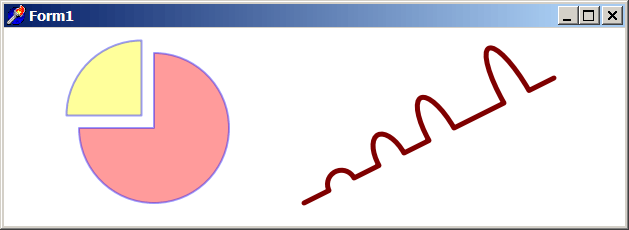
Path commands example
This is a cumulative example demonstrating several of the path commands.
Example
if VG.Attach(Image1.Picture.Bitmap) then begin

  VG.ClearAll(255, 255, 255);

  // 3/4 Red Pie
  VG.ResetPath;
  VG.FillColor(255, 0, 0, 100);
  VG.LineColor(0, 0, 255, 100);
  VG.LineWidth (2);

  VG.MoveTo(300 / 2, 200 / 2);
  VG.HorLineRel(-150 / 2);
  VG.ArcRel(150 / 2, 150 / 2, 0, true, false, 150 / 2, -150 / 2);
  VG.ClosePolygon;
  VG.DrawPath;

  // 1/4 Yellow Pie
  VG.ResetPath;
  VG.FillColor(255, 255, 0, 100);
  VG.LineColor(0, 0, 255, 100);
  VG.LineWidth(2);

  VG.MoveTo(275 / 2, 175 / 2);
  VG.VerLineRel(-150 / 2);
  VG.ArcRel(150 / 2, 150 / 2, 0, false, false, -150 / 2, 150 / 2);
  VG.ClosePolygon;
  VG.DrawPath;

  // Path line with Arcs
  VG.ResetPath;
  VG.NoFill;
  VG.LineColor(127, 0, 0);
  VG.LineWidth(5);

  VG.MoveTo(600 / 2, 350 / 2);
  VG.LineRel(50 / 2, -25 / 2);
  VG.ArcRel(25 / 2 , 25 / 2, deg2Rad(-30), false, true, 50 / 2, -25 / 2);
  VG.LineRel(50 / 2, -25 / 2);
  VG.ArcRel(25 / 2, 50 / 2, deg2Rad(-30), false, true, 50 / 2, -25 / 2);
  VG.LineRel(50 / 2, -25 / 2);
  VG.ArcRel(25 / 2, 75 / 2, deg2Rad(-30), false, true, 50 / 2, -25 / 2);
  VG.LineRel(50, -25);
  VG.ArcRel(25 / 2, 100 / 2, deg2Rad(-30), false, true, 50 / 2, -25 / 2);
  VG.LineRel(50 / 2, -25 / 2);

  VG.DrawPath;

end;